

Did you know that when you format your text in WordPress you may be adding or changing the CSS in your page?
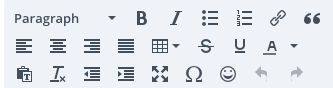
These are some of the options available in the text editor on Divi for WordPress. Every click of a button here represents the change of some sort of CSS in the backend of the website that changes the style in some way. I just learned about a few CSS tags and how they work with HTML, here are a few examples of these tags being used in WordPress.
Bolding
Bolding is one of the more straightforward examples of CSS. It uses a property called “font-weight” and a value of “bold” to make text bold. Other values here could include “normal”,”bolder”,”lighter”, or a specific number.
This is example text.
HTML: <p>This is example text.</p>
CSS: NA
This is example text.
HTML: <p>This is example text.</p>
CSS: p{font-weight:bold;}
Alignment
Alignment determines how the text is aligned on the page. The property is called “text-align” and the values are “left”, “center”, “right”, or “justified”.
This is example text.
HTML: <p>This is example text.</p>
CSS: p{text-align:left;}
This is example text.
HTML: <p>This is example text.</p>
CSS: p{text-align:center;}
This is example text.
HTML: <p>This is example text.</p>
CSS: p{text-align:right;}
Colors
Changing colors is a very easy way to draw attention to a webpage. There are a few ways that colors can be written in CSS but the most common ways are with hex codes (ex: #ff0000) or with specific names (ex: red). These methods can both work well but there is a limited number of colors that can be written by name. Pages will have a default text color so if no CSS is added, it will revert back to that, in this case it is a dark gray (#666666).
This is example text.
HTML: <p>This is example text.</p>
CSS: NA
This is example text.
HTML: <p>This is example text.</p>
CSS: p{color:#ff0000;} OR p{color:red;}